How Agents detect file changes - file system notifications
Agents participating in Enterprise Hybrid Work, Hybrid Work, Synchronization or File Caching Jobs must be able to detect file changes/updates in their Job folders as early as it's possible.
Distribution and Consolidation Jobs
Distribution and Consolidation Jobs only scan files during the start while Script Jobs don't operate on files at all.
Agents use the following techniques for file changes detection:
-
File system notifications (FS notifications)
The fastest way for the Agent to detect changes inside the synchronized folder. When FS notifications work properly, the Agent starts processing file immediately after the update. While FS notifications are fast, they have a number of limitations. -
Scheduled folder scan
It starts immediately after job creation or adding the Agent to the job. After that it runs every 24 hours (can be adjusted via Agent Profile). This is a very reliable way though it is slow and costs some disk performance. Additionally, Agent perform periodic smart hot folder scan (by default every hour; available from v4.1.0) -
On-demand folder rescan
On-demand scan works similarly to the scheduled scan. It can be initiated via the Management Console or the API.
After the Agent detects a new or updated file, it records an Updated file event in the Management Console. This event means that the Agent detected file update.
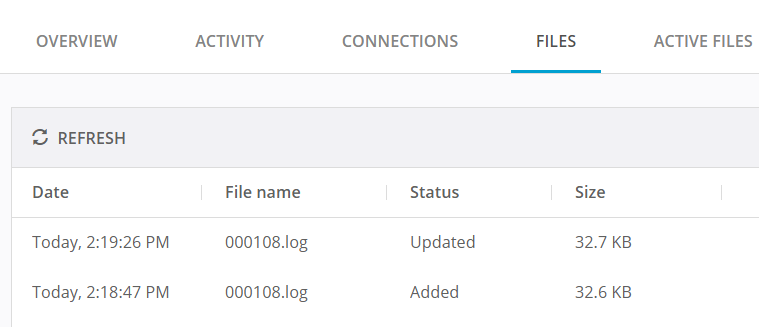
Agent will recheck the updated file and discover what was changed. Once rechecked and all Agents know that there's a newer file in the mesh, the file is added to download queue on other Agents.
File system notifications limitations
Windows limitations
- Operating system may not send FS notifications for files and folders when their path exceed 260 characters.
- If a watched folder resides on an SMB/CIFS share and either client or server does not support SMBv3 or newer (introduced in Windows 8 and newer), FS notifications will not work.
- OS may skip some notifications for bulk file updates.
Linux limitations
- If total amount of folders observed is greater than 8192 (all apps, not only Agent) - the Agent will only monitor a part of folders. This value can be increased up to 2BLN of folders though popular distros like Debian or Redhat in practice allow to monitor up to 524288 folders.
- NFS-mounted shares do not support FS notifications
BSD-based systems (not including OS X)
- File system notifications are not supported on FreeBSD, FreeNAS, TrueNAS and other systems forked from FreeBSD
Mixed environments limitations and known issues
- Windows machines do not receive FS notifications from Linux-hosted shares mounted over NFS.
-
Windows machines can receive FS notifications from Linux-hosted shares mounted over SMB if:
- Windows machine supports SMBv3
- Linux machine supports Samba v4.1 (which is the first version supporting SMBv3 for Linux)
- Linux machine has enough inotify watches to actually know of file changes itself
-
Windows machines can receive FS notifications from FreeNAS-hosted ZFS shares mounted over SMB though in practice FS notifications may not work sometimes for no reason.
- Windows machines can receive FS notifications from Synology-hosted shares mounted over SMB though same limits as in the second list item apply.
File system notifications in Resilio 6.0
FS notifications events are not supported on the Primary Storage Agent in Enterprise Hybrid Work Jobs. Files added directly to the SMB share or Nasuni Edge Appliance are picked up when end users start browsing the Job folder. When file changes are initiated by an end user, they are detected by the Agent immediately and then the Primary Storage Agent broadcasts a corresponding event to all Agents participating in a given Job.