No TSS icons on Windows Agent
TSS icons may be missing on the Windows Agent due to Windows operating system limiting the number of ShellIconOverlayIdentifiers to a maximum of 15 entries in alphabetical order.
To solve the issue:
- Open Registry Editor and navigate to
Computer\HKEY_LOCAL_MACHINE\SOFTWARE\Microsoft\Windows\CurrentVersion\Explorer\ShellIconOverlayIdentifiers. -
Add leading spaces to
ResilioFSentries or delete items that alphabetically come before them, to moveResilioFSentries up in the queue of icon overlay handlers.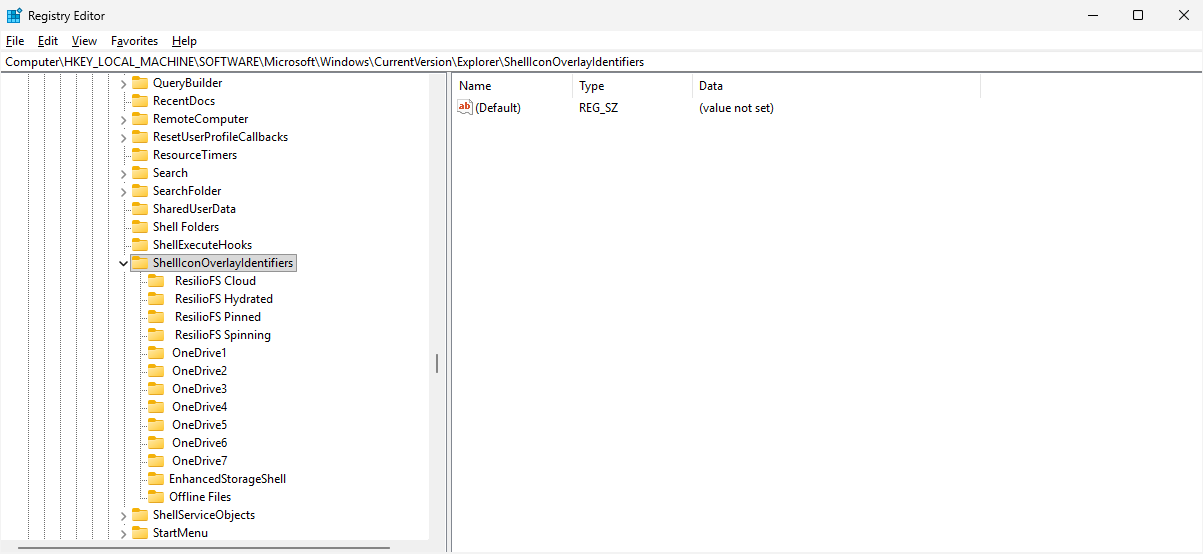
Missing ResilioFS entries
If the ResilioFS entries are missing, register File Explorer shell extension by running the following command in an elevated Command Prompt in the Agent installation directory:
- Restart the Windows Explorer process.