
How Midwestern State University Replaced DFSR to Strengthen Disaster Recovery with Resilio Active Everywhere
As file storage grew beyond what DFSR could reliably handle, a lean IT team at MSU Texas turned to Resilio for near-real-time replication to an offsite location 200 miles away. Plus, a faster way to recover from everyday file mistakes.
25 TB
File data replicated
200+ miles
Distance to offsite DR location
Minutes
To recover files from the sync archive
Midwestern State University (MSU Texas), located in Wichita Falls, is a public liberal arts university serving nearly 6,000 undergraduate and graduate students across programs ranging from health sciences and nursing to business, engineering, and the humanities. As the only public liberal arts university in Texas, MSU Texas pairs a broad academic portfolio with a student-focused environment and an average class size of about 30.
Supporting that environment falls to a lean IT team that keeps shared file storage available for faculty teaching materials, courseware, admissions records, and departmental documents. With storage growing year over year, severe weather a constant reality in North Texas, and a secondary university site more than 200 miles away in the Dallas-Fort Worth metroplex, the team needed a reliable way to keep critical files replicated across locations—and know for certain that the offsite copy was current.
The Challenge
Why DFSR Couldn't Keep Up With a Growing File Environment
For years, MSU Texas relied on Microsoft Distributed File System Replication (DFSR) to replicate shared files between its Wichita Falls campus and an offsite university location in Flower Mound, Texas. The goal was straightforward: maintain a near-real-time offsite copy so the DFS Namespace could redirect users to the secondary server if the primary server ever went down.
As file shares expanded year after year—faculty archiving semesters of teaching materials, departmental records, and recruitment documentation—a storage refresh finally pushed the environment past DFSR's practical limits. Replication became unreliable in subtle ways: files would stack up in the backlog with no clear explanation, and DFSR's diagnostic tools offered little meaningful insight into what was going wrong.
“DFSR was quirky. Sometimes things just didn't do what they were supposed to. You'd look at the backlog, and there'd be tons of files sitting there, and it couldn't tell you why.” Shane Perry, IT Operations Manager at Midwestern State University
For a small team supporting thousands of users, a replication service that couldn't be trusted, or even diagnosed, wasn't sustainable.
A DR Strategy That Depended on a System They Couldn't See Into
MSU Texas's business continuity plan depended on having a current offsite copy. If the campus data center went down—whether from a hardware failure, a planned maintenance window, or a North Texas tornado—DFS Namespace would redirect users to the Flower Mound server, where they'd keep working against what was supposed to be an up-to-date replica.
The problem was confidence. With DFSR silently falling behind, Perry couldn't confirm whether failover would actually deliver a consistent, usable copy when the university needed it most. Backups existed as a separate protection layer, but backups aren't the same thing as active-passive high availability—and restores from backup don't keep faculty and staff working during an outage.
“We needed that data to be as consistent as possible between the two servers, if and when something happens.” Shane Perry, IT Operations Manager at Midwestern State University
The combination of scale limits, unpredictable replication, and zero visibility made DFSR untenable as the foundation of the university's DR strategy.
The Solution
Finding a DFSR Replacement Built for Transparency at Scale
Searching for alternatives, Perry came across Resilio and scheduled a demo. The platform did exactly what his team needed DFSR to do: predictable, near-real-time replication between sites with clear visibility into sync status—and it worked alongside the existing DFS Namespace, so end users wouldn't notice any change in how they accessed files.
“We discovered your product, set up a call, and you guys did a demo. It did everything we needed and more.” Shane Perry, IT Operations Manager at Midwestern State University
Onboarding was fast. Resilio's support team walked MSU Texas through configuration in under an hour, and replication between sites began almost immediately. When initial sync traffic temporarily saturated the metro link between Wichita Falls and Flower Mound, Resilio support helped Perry tune bandwidth controls to align with the university's WAN, without pausing or disrupting ongoing replication.

Continuous Replication Across Texas, Transparent to Users
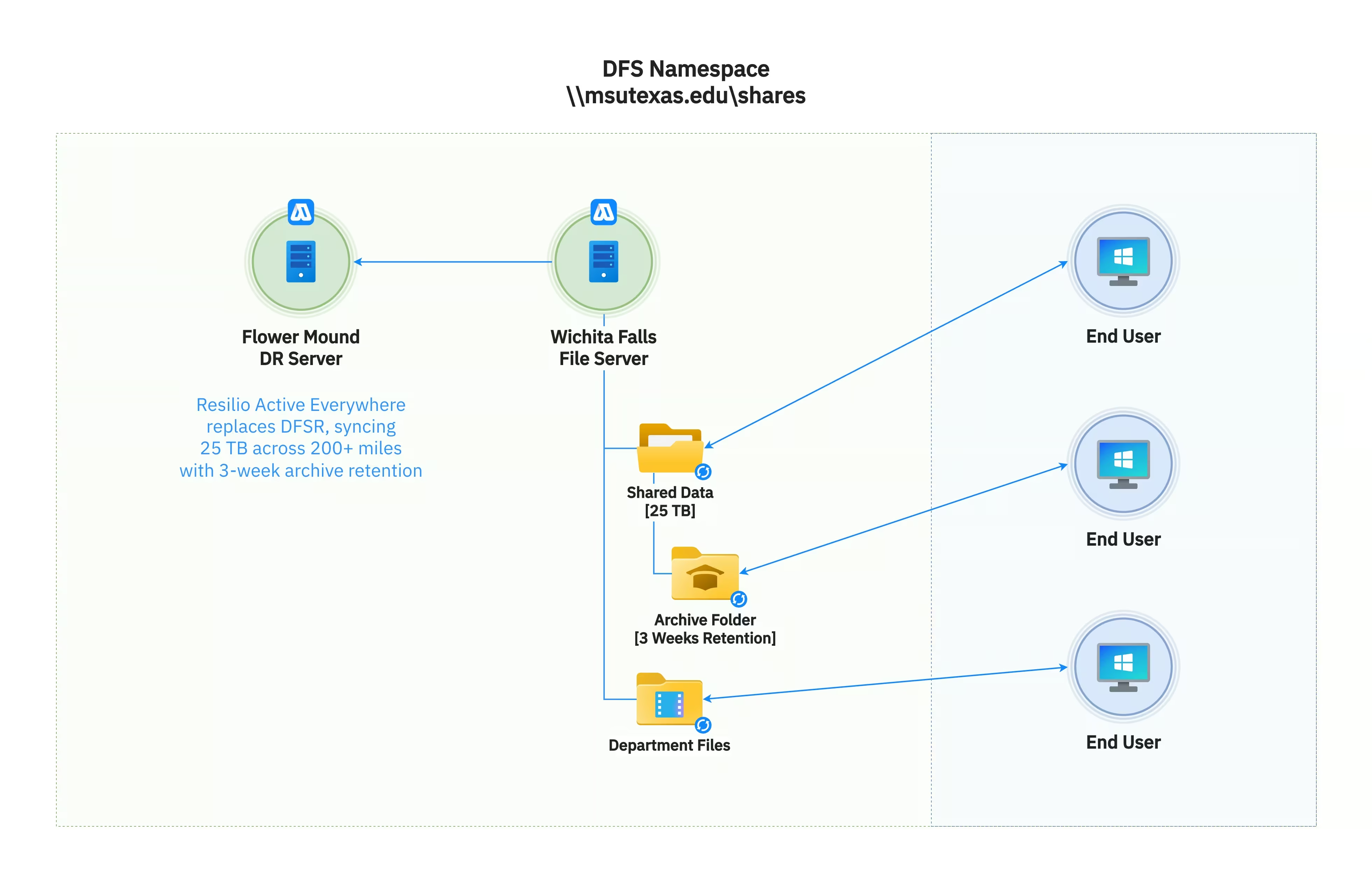
Today, Resilio Active Everywhere continuously synchronizes approximately 25 TB of shared file data between the production server in Wichita Falls and the secondary server in Flower Mound. DFS Namespace sits in front of the architecture, so when the primary goes offline, whether for monthly patching or an unplanned outage, users are automatically redirected to the current replica at the secondary site.
For the IT team, that means maintenance windows no longer require careful user communication or after-hours scheduling. Patch the primary, users roll to the secondary, and any changes made during the window replicate back once the primary returns to service. With no manual intervention required.
The Results
Near Real-Time Offsite Replication With Visibility the Team Can Trust
Since replacing DFSR, MSU Texas has a disaster recovery posture Perry can actually verify. Replication status is visible in real time through the Resilio management console, so there's no more guessing whether files reached Flower Mound or troubleshooting an opaque backlog.
Most importantly, end users don't notice any of it. When Perry reboots the primary server for a monthly patch cycle, DFS Namespace redirects traffic to the replica, and faculty and staff keep working.
“That ability to know I have the data replicated in real time offsite is huge. If the main server goes offline, users get redirected, and most of the time they don't even notice anything happened.” Shane Perry, IT Operations Manager at Midwestern State University
The Archive Folder: An Unexpected Daily Recovery Tool
The biggest day-to-day benefit wasn't in the demo; Perry discovered it after deployment. Every time Resilio replicates a modified or deleted file, it retains the previous version in a configurable sync archive. Perry extended MSU's retention to three weeks, and it's become his go-to recovery path for the everyday accidents that used to trigger a full backup restore.
When a user deletes or corrupts a file, Perry pulls the previous version from the archive folder and restores it, and they're back up and running in minutes. Backup remains an essential protection layer, but it's no longer the first tool he reaches for when a ticket comes in.
“The product did everything I wanted when we bought it, but the archive [folder] was icing on the cake. Instead of running a restore from backups, I can grab the previous version from the archive and have the user back up in minutes.” Shane Perry, IT Operations Manager at Midwestern State University
For a small IT team serving thousands of users across campus, those time savings add up, as does the goodwill with users who get their work back quickly.
Move Faster
Midwestern State University runs on Resilio
With replication now reliable at scale, Perry is evaluating Resilio's distributed file locking feature next—a common need in university environments where users leave spreadsheets and documents open for days at a time. The architecture already in place, near-real-time replication, DFS Namespace failover, and archive recovery, provides the IT team with a foundation to keep building on as the university's data continues to grow.
IT teams shouldn't have to wonder whether their replication is keeping up. Resilio keeps data synchronized and available across sites, so your team can focus on serving users instead of troubleshooting sync.
Ready to move faster? Schedule a demo to see how Resilio can strengthen your disaster recovery.
Industry
Higher Education
Product
Solution
Overview
MSU Texas replaced DFSR with Resilio to continuously replicate 25 TB of file data to an offsite DR site 200 miles away, improve DR readiness, and give a lean IT team faster daily file recovery.
Explore Resilio Active Everywhere
Featured Resources

Fast and Reliable DFSR Replacement
Get a high-performance replacement for Microsoft Windows Distributed File System Replication (DFSR) for SMB file server replication.

Resilio for DFSR Replacement
Active Everywhere is a high-performance replacement for Microsoft DFSR that offers improved speed, reliability, and visibility.

Why DFS Replication Is Not Working(And How to Fix It)
We've compiled a list of the most common DFS replication failure scenarios and share some suggested ways to overcome them.